> ## Documentation Index
> Fetch the complete documentation index at: https://danswer-mintlify-deep-research-1773355783.mintlify.site/llms.txt
> Use this file to discover all available pages before exploring further.
# Overview
> Configuring AI Providers and Models in Onyx
You can configure Onyx to work with any AI provider and model!
## AI Configuration
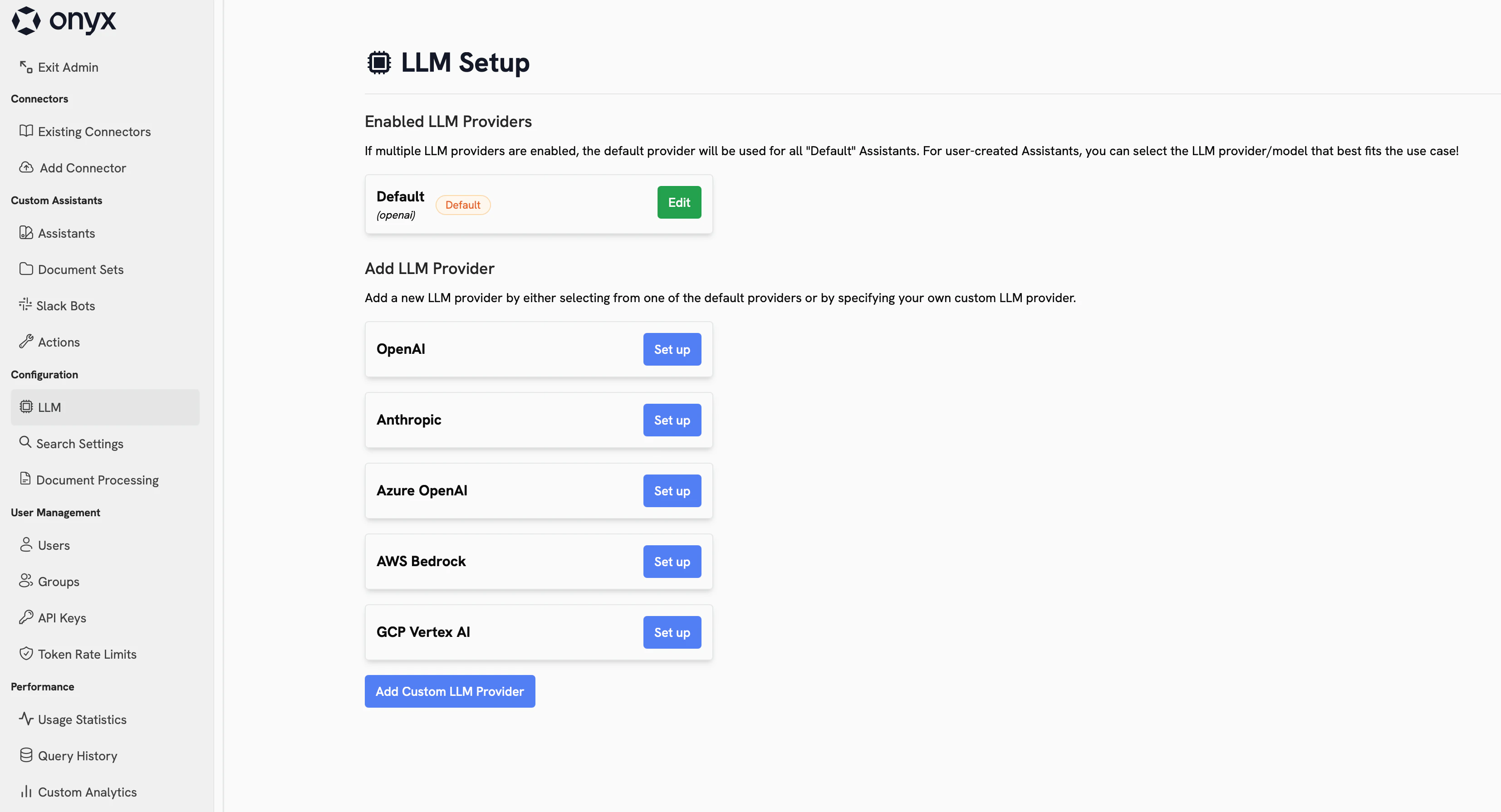
Navigate to: **Admin Panel → Configuration → LLM** to access the AI configuration page. From here,
you can select which provider and models you want to use in Onyx.
 ### AI Providers
Cloud providers are either foundation model developers (e.g. OpenAI, Anthropic) or cloud platforms (e.g. AWS,
Google, Azure) that make AI models accessible via hosted API endpoints.
Some AI models are only available directly from the model creator (e.g. OpenAI's GPT models).
Others are distributed through managed cloud services such as AWS Bedrock, Google Vertex AI, or Azure OpenAI.
These platforms provide enterprise-grade access with integration into their broader cloud ecosystem.
Onyx natively supports both types.
Oftentimes,
managed cloud services maintain the same Terms of Service and Data Processing Agreements for AI inference as their
other services.
Self-hosted providers are tools and frameworks that let you run AI models on your own infrastructure,
rather than relying on an external cloud service.
Self-hosted models are open-weight and available for free download, such as Meta's Llama models, DeepSeek, and Qwen.
Onyx supports any OpenAI-compatible gateway or inference server, like [Ollama](/admins/ai_models/ollama).
### Recommended Models
If cloud AI models are approved for your organization, we recommend using them because of capability, speed, and cost.
#### Cloud Models
* **OpenAI**: State of the art models for reasoning, coding, image generation, and general tasks. Use models like `GPT-4o`, `GPT-4.1`, `o3`, `GPT-5`.
* **Anthropic**: Excels at natural, human-sounding language and coding. Use models like `Claude 4 Sonnet` and `Claude 4 Opus`
#### Self-Hosted Models
* **gpt-oss-20b**: OpenAI's open-weight model optimized for chain-of-thought reasoning.
* **Llama 4 and 3.3. family**:
Meta's latest models with excellent performance and varying model sizes for various hardware.
* **Qwen-3 family**
* **DeepSeek-R1**
Self-hosting models is only recommended for advanced users and teams with specific needs.
## Configure Your Providers
## Best Practices
* Review the Terms of Service and Data Processing Agreements for the providers you want to use
* Review the data you choose to index in Onyx
* Clearly instruct your users on appropriate data to use with Onyx
### AI Providers
Cloud providers are either foundation model developers (e.g. OpenAI, Anthropic) or cloud platforms (e.g. AWS,
Google, Azure) that make AI models accessible via hosted API endpoints.
Some AI models are only available directly from the model creator (e.g. OpenAI's GPT models).
Others are distributed through managed cloud services such as AWS Bedrock, Google Vertex AI, or Azure OpenAI.
These platforms provide enterprise-grade access with integration into their broader cloud ecosystem.
Onyx natively supports both types.
Oftentimes,
managed cloud services maintain the same Terms of Service and Data Processing Agreements for AI inference as their
other services.
Self-hosted providers are tools and frameworks that let you run AI models on your own infrastructure,
rather than relying on an external cloud service.
Self-hosted models are open-weight and available for free download, such as Meta's Llama models, DeepSeek, and Qwen.
Onyx supports any OpenAI-compatible gateway or inference server, like [Ollama](/admins/ai_models/ollama).
### Recommended Models
If cloud AI models are approved for your organization, we recommend using them because of capability, speed, and cost.
#### Cloud Models
* **OpenAI**: State of the art models for reasoning, coding, image generation, and general tasks. Use models like `GPT-4o`, `GPT-4.1`, `o3`, `GPT-5`.
* **Anthropic**: Excels at natural, human-sounding language and coding. Use models like `Claude 4 Sonnet` and `Claude 4 Opus`
#### Self-Hosted Models
* **gpt-oss-20b**: OpenAI's open-weight model optimized for chain-of-thought reasoning.
* **Llama 4 and 3.3. family**:
Meta's latest models with excellent performance and varying model sizes for various hardware.
* **Qwen-3 family**
* **DeepSeek-R1**
Self-hosting models is only recommended for advanced users and teams with specific needs.
## Configure Your Providers
## Best Practices
* Review the Terms of Service and Data Processing Agreements for the providers you want to use
* Review the data you choose to index in Onyx
* Clearly instruct your users on appropriate data to use with Onyx